How to Build a Golf Simulator at Home: A Step-by-Step Guide
To build a home golf simulator, you need five things: a room that fits your swing, an enclosure with an impact screen, a hitting mat, a launch monitor, and a way to display the shot (a projector or a tablet). Measure your room first, then buy in that order, because the room decides which enclosure fits and the enclosure decides almost everything else.
Here is the step-by-step process we walk customers through, with the real products and sizes we carry.
Step 1: Measure your room
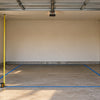
Write down three numbers: ceiling height at the spot where you will swing, open width, and depth from the screen wall to the back wall. Measure to the lowest obstruction, like a garage door track or light fixture, not the drywall.
- Ceiling: about 9 ft is the practical minimum for a full driver swing; 10 ft is comfortable for most people.
- Width: 10 ft works for one-handed play; 12 ft or more lets righties and lefties share the space.
- Depth: plan on 8 to 10 ft between the ball and the screen, plus room behind you to swing.
Our room-size guide, Will a Golf Simulator Fit in My Garage?, goes through each measurement in detail.
Step 2: Choose an enclosure and impact screen
The enclosure is the frame and side netting or fabric that holds the impact screen and contains mishits. Pick it to match your measurements, not the other way around.
- GolfBays EasySim ($799): about 10 ft 10 in wide, 8 ft 2 in tall and 3 ft 3 in deep, tool-free, with a 4:3 Lite impact screen. A good starting point for a single garage bay or spare room, and it packs down.
- GolfBays SimBox (seven sizes): widths from 8 ft 6 in to 13 ft 2 in and heights from 8 ft 2 in to 9 ft 10 in, with blackout side walls and an included screen. This is the one most garage builds use, because you can pick the size that fits your bay.
- GolfBays Lux ($2,999): a finished-room enclosure with premium non-reflective fabric. Plan on 10 ft of ceiling, 12 ft of width and 15 ft of depth.
- Yunic metal-frame cage with impact screen: a budget option in five sizes, from 8 × 8 × 5 ft to 10 × 10 × 10 ft, with a hitting mat included.
If you already have a frame or want to upgrade later, the GolfBays Pro+ impact screen is a commercial-grade replacement that comes in ten sizes. Measure your frame opening and choose the matching size.
Step 3: Add a hitting mat
A thin mat on concrete is hard on your wrists and elbows, and it lets you get away with fat shots that would dig on real turf. Get a mat sized to your enclosure with some cushioning underneath.
- GolfBays Standard Hitting Mat: 4'11" x 4'11", sized for GolfBays enclosures, with an optional rubber base for extra cushioning.
Step 4: Pick a launch monitor
The launch monitor is what turns a net into a simulator. It measures the ball (and sometimes the club) at impact and sends the data to your software. Two very different options:
- Garmin Approach R10 ($599.99): a portable radar unit that sits about 6 to 8 ft behind the ball. It reports club head speed, ball speed, spin rate, launch angle, launch direction and carry. Course play in the Garmin Golf app and third-party software may need a paid subscription, sold separately. Because it sits behind you, it needs more room depth.
- Uneekor EYE XO ($6,499): a ceiling-mounted unit with two high-speed cameras. It reads ball speed, launch, spin, carry, plus club path, face angle and impact location, with no marked balls, and works for right- and left-handed players without moving it. Plan on at least 9 ft of ceiling.
Rule of thumb: start with a portable unit if you are testing the idea or have a tight budget; go overhead if the room is permanent and more than one person will play.
Step 5: Set up the display and software
Most builds use a projector mounted above or behind the hitting area, aimed at the impact screen. Match the projector's aspect ratio to your screen (for example, the EasySim uses a 4:3 screen) and look for a short-throw model so the image fills the screen from a realistic mounting distance without you casting a shadow. If you are not ready for a projector, a tablet or TV beside the mat works fine with the R10's app.
For software, check what your launch monitor supports. The EYE XO runs Uneekor's software and works with GSPro and other platforms; the R10 works with the Garmin Golf app and several third-party programs.
Step 6: Protect the room and finish it
- Foam triangle wedge pelmet: seals the gap between the mat and the bottom of the screen so low shots stop rolling under it. Available in six widths, from 8'6" to 16'5".
- GolfBays blackout screen: helps the projected image look sharper in a bright garage.
Want a ballpark budget before you start? Read How much does a home golf simulator cost?
Common mistakes
- Buying the launch monitor first. Radar units need depth and overhead units need ceiling height. Confirm the room before you pick one.
- Measuring to the drywall. Garage door tracks, openers and lights are what your club will actually hit.
- Standing too close to the screen. Stay 8 to 10 ft back for safety and so the ball registers on most launch monitors.
- Skipping the mat cushioning. A thin mat on concrete is a common cause of sore wrists in home setups.
- Forgetting software costs. Some course-play software needs a subscription. Check before you buy.
Get a free fit check
Not sure which enclosure or launch monitor fits your space? Send us your ceiling height, width and depth (a photo helps) and we will tell you what fits before you buy. Use the chat button on this page, text (714) 343-7110, or email info@gryngolf.com. We ship within the US.
-
Posted in
buying-guide, garage, how-to, simulators